Your database may have millions of records, but usually you are working with a subset of records. For example, when managing a large project tracking system, you might filter to show only active tasks for your department. Visual DB lets you use query parameters to specify which records to load, so you can work efficiently with the subset of data you need. If you need a different subset, simply update the query parameter to fetch the new data.
With the subset of interest loaded into the browser, you can work very efficiently. For example you can quickly find a record within that subset by using the full-text search feature of Visual DB. Operations such as grouping and sorting are instant because they work on the subset loaded into the browser, not the entire database of millions of records.
Compare this to the competition: they either limit the number of records in a table to a few tens of thousands, or attempt to handle millions of records using infinite scroll – resulting in poor grouping and searching performance because they can’t fit millions of records in browser memory!
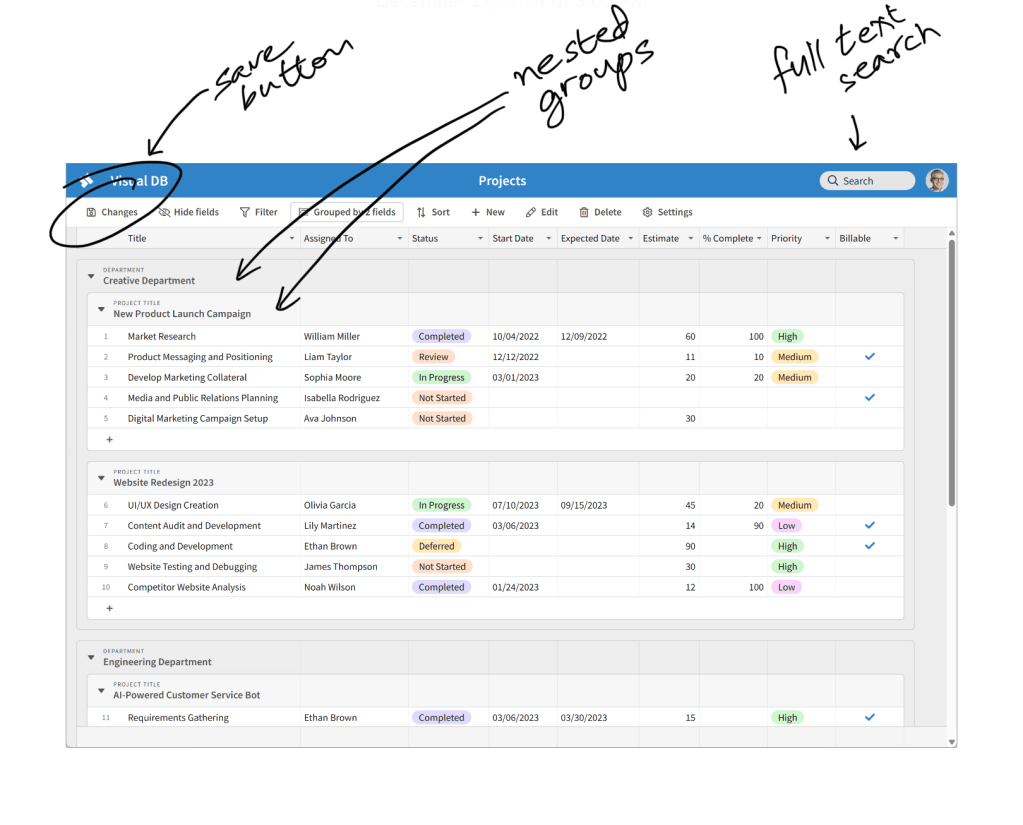
Visual DB Sheets supports nested groups. You can quickly find records using full-text search. The save button can preview your changes before committing changes to the database.
Visual DB offers powerful parameter prompting capabilities to help users select the data they need. You can define multiple parameters to filter your data – for example, selecting both a date range and a department. Parameters can accept multiple values, letting users choose several options at once, such as viewing tasks for both the Marketing and Sales teams. Visual DB also supports cascading parameters, where the value chosen in one parameter determines the available choices in another. For instance, when a user selects a Product Category, the Product selection dropdown automatically updates to show only products in that category.
In Visual DB Sheets, features such as as-you-type incremental search and offline-viewable snapshots perform well because you are working with a well-defined subset of data, rather than attempting to handle millions of records simultaneously.
Once a query is defined it can be reused in Forms, Sheets and Reports, saving you time.
 Visual DB